 Post by
Have you ever wondered what happens behind the scenes when you enter a website address such as https://example.com into your browser and press Enter? Although a webpage may appear almost instantly, several important processes take place between your browser, DNS servers, network infrastructure, and the web server. Understanding this process provides valuable insight into how websites work and how modern web applications deliver content efficiently and securely.
When you enter a URL (Uniform Resource Locator), the browser first analyzes the address to determine the requested domain, protocol, and resource. It then performs a DNS (Domain Name System) lookup to translate the human-readable domain name into an IP address that computers can use to locate the appropriate server. Once the server's IP address is identified, the browser establishes a network connection. For an HTTPS website, the connection is secured using TLS (Transport Layer Security), which encrypts communication and helps protect sensitive information from unauthorized access.
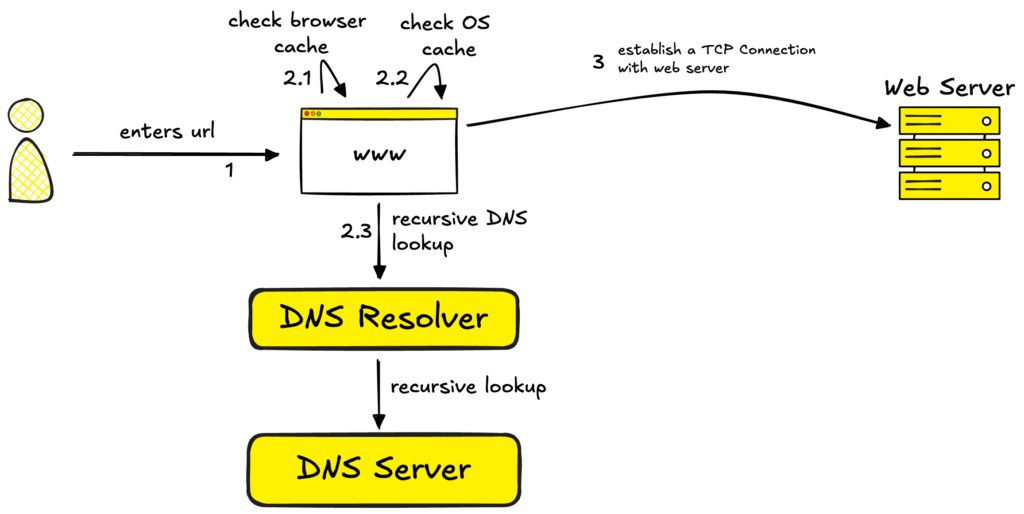
The browser then sends an HTTP request to the web server asking for the requested webpage or resource. The server processes this request and may retrieve files, communicate with databases, execute backend application logic, or perform other operations before generating a response. The server then returns an HTTP response, which can include HTML, CSS, JavaScript, images, fonts, and other resources required to display the website.
URL → DNS Lookup → IP Address → Secure Connection → HTTP Request → Server Processing → HTTP Response → Browser Rendering → Website
When you type a URL into your browser and press Enter, several processes happen behind the scenes before the website appears on your screen. First, the browser reads the URL and performs a DNS lookup to convert the domain name into an IP address, which identifies the server hosting the website. The browser then establishes a secure HTTPS connection using TLS to protect communication between your device and the server. Next, it sends an HTTP request asking the server for the requested webpage. The server processes this request, which may involve accessing files, databases, or backend applications, and then sends an HTTP response containing resources such as HTML, CSS, JavaScript, images, and fonts. Finally, the browser processes these resources, builds the page structure, applies styles, executes JavaScript, and renders the webpage on your screen. In simple terms, the journey is URL → DNS Lookup → IP Address → Secure Connection → HTTP Request → Server Processing → HTTP Response → Browser Rendering → Website.
Understanding what happens when you type a URL is fundamental for anyone interested in web development, networking, cybersecurity, and website performance. It also helps developers identify potential performance bottlenecks, understand how HTTPS protects users, and build faster and more reliable web applications.The next time you type a URL and a webpage appears almost instantly, remember that a complex chain of technologies is working behind the scenes to make that simple experience possible
Conclusion,
Typing a URL may seem like a simple action, but it triggers a complex series of processes behind the scenes. From DNS lookup and secure connections to HTTP requests, server processing, and browser rendering, each step plays an important role in delivering a webpage quickly and securely. Understanding this process gives developers a better foundation in web development, networking, website performance, and cybersecurity. The next time you open a website, remember that a lot happens behind that simple click.